
Assign Feature Access, Empower Your Team, and Protect Your Platform
Every growing business needs a secure, flexible way to manage user access. Whether you’re building solo or collaborating with a team, the User Access Dashboard gives you full control over who sees what—and what they can do.
Easily assign dashboard permissions, style your login and registration flows, and protect your app with built-in security tools.
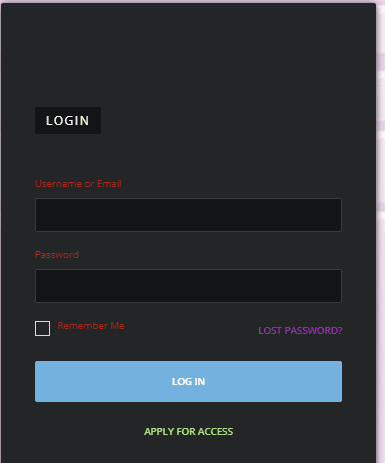
Style the Login Experience & Lock Down Your App’s Access
Your login page is the front door to your digital business. From visual styling to security protocols, you can customize every detail—ensuring a seamless, on-brand experience for users while protecting your backend from threats.
Colors
Note from WP Frontend Admin: The admin content will load in this place when you view the page outside the Visual Page Builder editor.
Brand Your Login Form
Customize every color of your login form to reflect your visual identity. Build trust and recognition with consistent branding.
Layout
Note from WP Frontend Admin: The admin content will load in this place when you view the page outside the Visual Page Builder editor.
Choose Your Layout & Call-to-Action
Select a login layout that suits your app’s style. Customize call-to-action buttons and field arrangements to guide users smoothly.
Lost Password
Note from WP Frontend Admin: The admin content will load in this place when you view the page outside the Visual Page Builder editor.
Design a Helpful Password Reset Experience
Provide users with a branded reset form they can trust—complete with automated links, confirmation messaging, and styling that matches the rest of your app.
Captcha
Note from WP Frontend Admin: The admin content will load in this place when you view the page outside the Visual Page Builder editor.
Add Protection with Captcha Security
Prevent bots and brute-force attacks by enabling Captcha. Simply enter your key and stop threats before they start.
Social Login
Note from WP Frontend Admin: The admin content will load in this place when you view the page outside the Visual Page Builder editor.
Enable Social Logins for Fast Access
Allow users to log in with their social media accounts. Improve accessibility and reduce login friction across devices.
Login Attempts
Note from WP Frontend Admin: The admin content will load in this place when you view the page outside the Visual Page Builder editor.
Set Login Security Rules
Define how many attempts are allowed, lockout durations, and notifications—keeping your app secure and your team’s access under control.
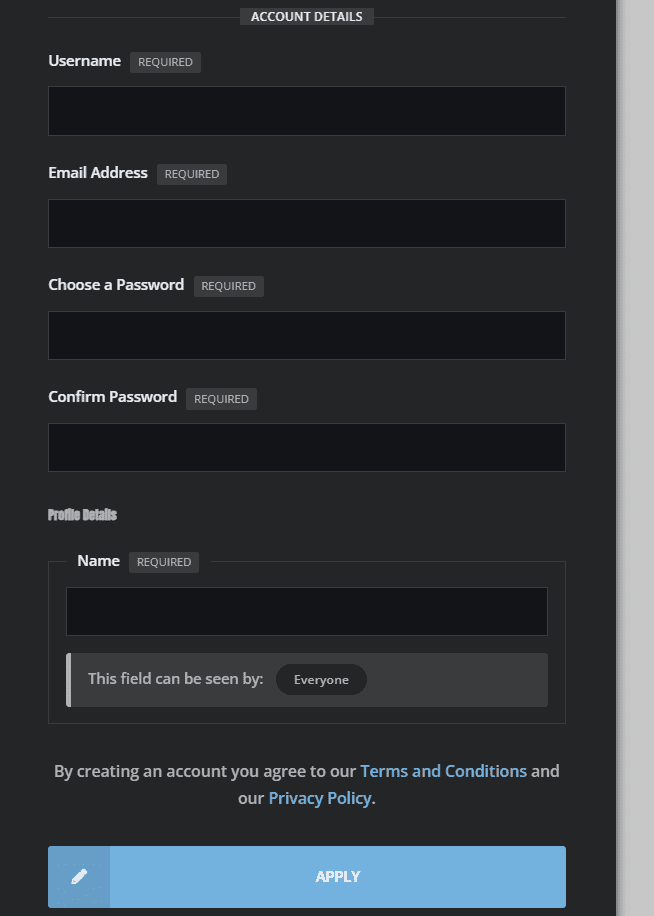
Customize Your Registration Experience & Collect What Matters
Your registration form is more than a gateway—it’s the first handshake between your app and your new member. Build trust instantly with branded, streamlined forms that collect only what you need. Then, automate everything else behind the scenes.
Colors
Note from WP Frontend Admin: The admin content will load in this place when you view the page outside the Visual Page Builder editor.
Style Your New Member Form
Choose brand-aligned color schemes for buttons, backgrounds, labels, and inputs—ensuring every form fits seamlessly into your app’s design system.
Layout
Note from WP Frontend Admin: The admin content will load in this place when you view the page outside the Visual Page Builder editor.
Define the Flow of Registration
Set the layout, field order, and button copy to guide users through sign-up without confusion. Make it simple, intuitive, and fully aligned with your brand voice.
Give Each User the Access They Need
Every app is built by a team—even if that team starts with one. Assign roles and dashboard access levels to collaborators, contributors, and clients without exposing unnecessary features. Stay flexible as your business scales.
Note from WP Frontend Admin: The admin content will load in this place when you view the page outside the Visual Page Builder editor.
Assign Roles for Content Creation
Control who can create, edit, and publish across your app. From blog posts to landing pages, assign content-building permissions to selected roles so your digital voice stays consistent—no matter how many team members contribute.
Note from WP Frontend Admin: The admin content will load in this place when you view the page outside the Visual Page Builder editor.
Style the Login Experience & Lock Down Your App’s Access
Your login page is the front door to your digital business. From visual styling to security protocols, you can customize every detail—ensuring a seamless, on-brand experience for users while protecting your backend from threats.
Colors
Note from WP Frontend Admin: The admin content will load in this place when you view the page outside the Visual Page Builder editor.
Brand Your Login Form
Customize every color of your login form to reflect your visual identity. Build trust and recognition with consistent branding.
Layout
Note from WP Frontend Admin: The admin content will load in this place when you view the page outside the Visual Page Builder editor.
Choose Your Layout & Call-to-Action
Select a login layout that suits your app’s style. Customize call-to-action buttons and field arrangements to guide users smoothly.
Lost Password
Note from WP Frontend Admin: The admin content will load in this place when you view the page outside the Visual Page Builder editor.
Design a Helpful Password Reset Experience
Provide users with a branded reset form they can trust—complete with automated links, confirmation messaging, and styling that matches the rest of your app.
Captcha
Note from WP Frontend Admin: The admin content will load in this place when you view the page outside the Visual Page Builder editor.
Add Protection with Captcha Security
Prevent bots and brute-force attacks by enabling Captcha. Simply enter your key and stop threats before they start.
Social Login
Note from WP Frontend Admin: The admin content will load in this place when you view the page outside the Visual Page Builder editor.
Enable Social Logins for Fast Access
Allow users to log in with their social media accounts. Improve accessibility and reduce login friction across devices.
Login Attempts
Note from WP Frontend Admin: The admin content will load in this place when you view the page outside the Visual Page Builder editor.
Set Login Security Rules
Define how many attempts are allowed, lockout durations, and notifications—keeping your app secure and your team’s access under control.
[vg_display_admin_page page_url=”admin.php?page=youzify-membership-settings&tab=login-styling”]
Brand Your Login Form
Customize every color of your login form to reflect your visual identity. Build trust and recognition with consistent branding.
[vg_display_admin_page page_url=”admin.php?page=youzify-membership-settings&tab=login”]
Choose Your Layout & Call-to-Action
Select a login layout that suits your app’s style. Customize call-to-action buttons and field arrangements to guide users smoothly.
[vg_display_admin_page page_url=”admin.php?page=youzify-membership-settings&tab=lost-password”]
Design a Helpful Password Reset Experience
Provide users with a branded reset form they can trust—complete with automated links, confirmation messaging, and styling that matches the rest of your app.
[vg_display_admin_page page_url=”admin.php?page=youzify-membership-settings&tab=captcha”]
Add Protection with Captcha Security
Prevent bots and brute-force attacks by enabling Captcha. Simply enter your key and stop threats before they start.
[vg_display_admin_page page_url=”admin.php?page=youzify-membership-settings&tab=social-login”]
Enable Social Logins for Fast Access
Allow users to log in with their social media accounts. Improve accessibility and reduce login friction across devices.
[vg_display_admin_page page_url=”admin.php?page=youzify-membership-settings&tab=limit-login”]
Set Login Security Rules
Define how many attempts are allowed, lockout durations, and notifications—keeping your app secure and your team’s access under control.
Customize Your Registration Experience & Collect What Matters
Your registration form is more than a gateway—it’s the first handshake between your app and your new member. Build trust instantly with branded, streamlined forms that collect only what you need. Then, automate everything else behind the scenes.
Colors
Note from WP Frontend Admin: The admin content will load in this place when you view the page outside the Visual Page Builder editor.
Style Your New Member Form
Choose brand-aligned color schemes for buttons, backgrounds, labels, and inputs—ensuring every form fits seamlessly into your app’s design system.
Layout
Note from WP Frontend Admin: The admin content will load in this place when you view the page outside the Visual Page Builder editor.
Define the Flow of Registration
Set the layout, field order, and button copy to guide users through sign-up without confusion. Make it simple, intuitive, and fully aligned with your brand voice.
[vg_display_admin_page page_url=”admin.php?page=youzify-membership-settings&tab=register-styling”]
Style Your New Member Form
Choose brand-aligned color schemes for buttons, backgrounds, labels, and inputs—ensuring every form fits seamlessly into your app’s design system.
[vg_display_admin_page page_url=”admin.php?page=youzify-membership-settings&tab=register”]
Define the Flow of Registration
Set the layout, field order, and button copy to guide users through sign-up without confusion. Make it simple, intuitive, and fully aligned with your brand voice.
Give Each User the Access They Need
Every app is built by a team—even if that team starts with one. Assign roles and dashboard access levels to collaborators, contributors, and clients without exposing unnecessary features. Stay flexible as your business scales.
[vg_display_admin_page page_url=”users.php”]
Assign Roles for Content Creation
Control who can create, edit, and publish across your app. From blog posts to landing pages, assign content-building permissions to selected roles so your digital voice stays consistent—no matter how many team members contribute.
[vg_display_admin_page page_url=”admin.php?page=elementor-role-manager”]
Create Digital Ventures
Launch A New Web App
(Click Here)
Try Builder Dashboards For Free
Digital
Content
Online
Sales
Social
Networks
Rewards
Systems
Need Help Building & Growing The Web App? We are here to help!
Take advantage of a team with integrated AI tools to build & execute remote projects.
