Build Your Web App
Managed Web App Onboarding
Your Focus Items
When creating your Web App Logo, prioritize establishing brand consistency throughout your digital landscape. It’s crucial to consider all digital assets from the outset, as users often initiate their interaction with your business online.
Build Your Web App
Managed Web App Onboarding
Digital Logos
Defining Your Digital Presence Through Branded Logos
Site Logo – Versatility Matters
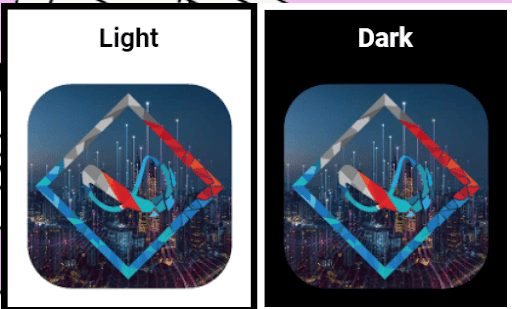
Ensure your Web App Logo shines on both light and dark backgrounds. With users customizing their settings, it’s vital to maintain a visually appealing logo in various situations where background shades may differ.
Site Favicon
Beyond your main logo, there are instances where a compact square version is essential. From serving as a favicon on browser tabs to becoming your App Icon on mobile devices, having a matching favicon is imperative for user recognition across the web. Design a favicon that resonates with users wherever they encounter your brand!

Your Theme Style Guide serves as the essential rulebook, shaping your brand’s voice across platforms. It outlines font types for a cohesive visual experience, a defined color spectrum to evoke emotions and enhance recognition, logo usage guidelines for consistent brand representation, and an overall look and feel standard for unified communication. This guide empowers your team to maintain brand integrity, fostering trust and leaving a lasting, impactful impression on your audience.
Build Your Web App
Managed Web App Onboarding
Digital Style Guide
Infusing Emotion into Your Online Palette
Choosing your brand colors goes beyond aesthetics; it’s a strategic decision to evoke the right emotions. In the digital realm, colors are represented by hex codes (e.g., white is #ffffff, black is #000000).
Streamline the management of your web app colors through the intuitive site settings dashboard, empowering your Digital Business to consistently reflect your branding choices as you visually pick your hex colors.
How to update Web App Global Colors
Elevate Your Web App’s Aesthetics with Ease
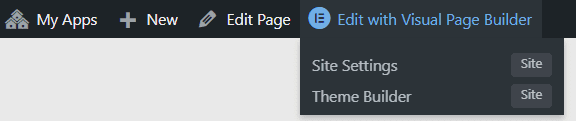
As an admin user viewing your connected web app, access color settings through the “Edit with Visual Page Builder” navigation item. Hover over it to reveal the “Site Settings” menu item and click on it.
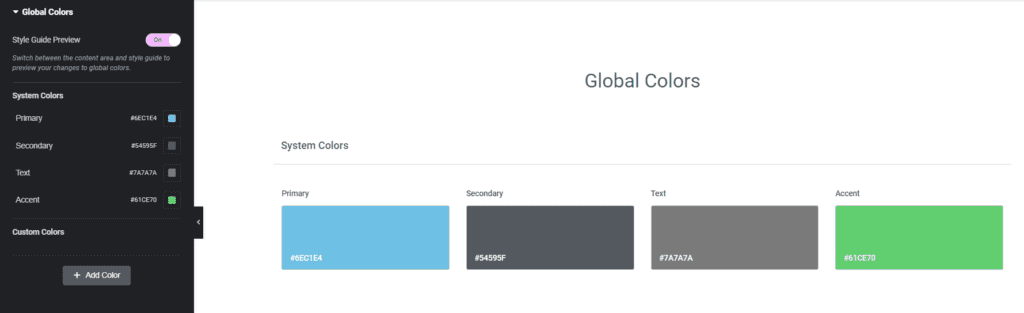
Within your Site Settings, click on “Global Colors.” Aligned with your Brand Style Guide, your web app will be meticulously matched to your brand colors. Share your main colors through the color picker below or provide RGB or Hex codes.
Ensure readability brilliance by carefully selecting font types for your Brand Style Guide, focusing on seamless rendering across the web.
Opt for a Google Font type that aligns with your brand’s identity. Explore a plethora of options at fonts.google.com.
How to update Web App Global Fonts
As an admin user viewing your connected web app, access font settings through the “Edit with Visual Page Builder” navigation item. Hover over it to reveal the “Site Settings” menu item and click on it.
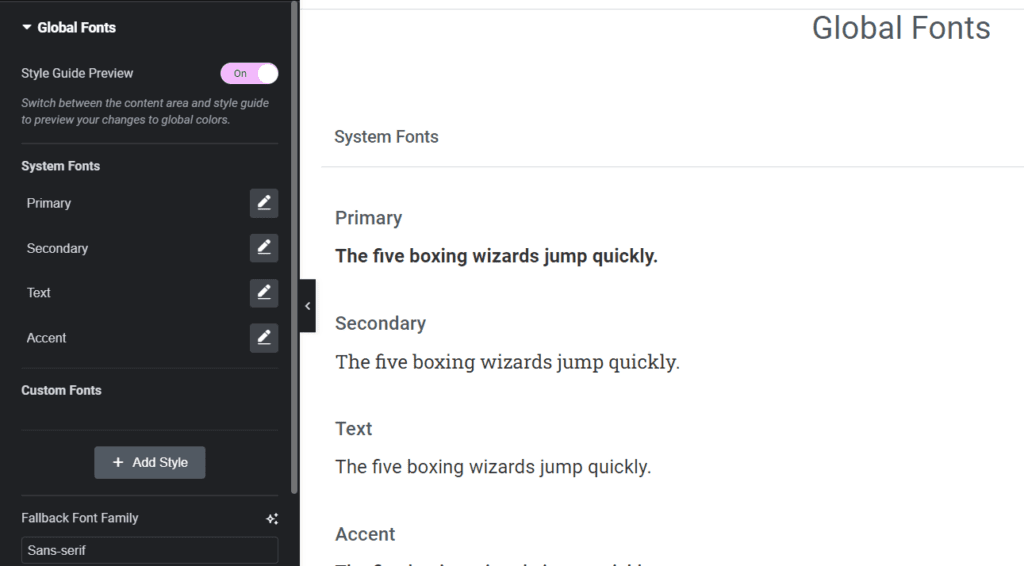
From there, navigate to the “Global Fonts” tab in the side menu of your “Site Settings.”
Effortlessly configure, manage, and update your web app’s site-wide settings from this centralized hub. Craft a captivating and consistent typographic experience for your users.
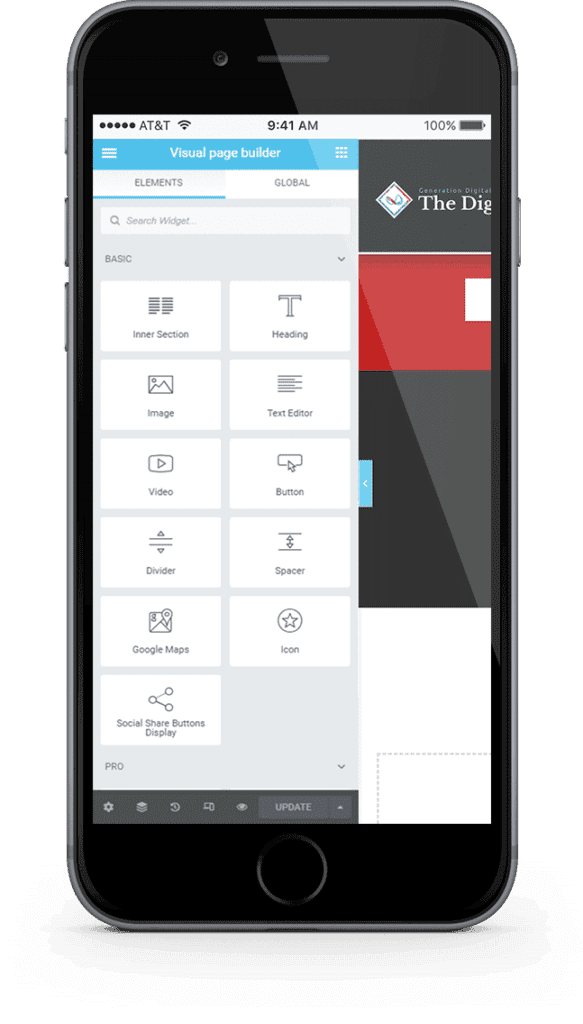
Visually create your entire theme from scratch or utilize pre-built templates for headers, footers, pages, and more!
We provide our members with easy-to-use, no-code tools, enabling them to build and own their entire Web App Theme effortlessly. Say goodbye to concerns about policies jeopardizing your hard work and audience engagement.
Take control of your web app’s aesthetic with ease.
Responsive Design
Develop and test designs seamlessly on Mobile, Tablet, and Desktop.
Customize the appearance and specify what content should be displayed on different devices for a responsive and user-friendly experience.
We provide our members with easy-to-use, no-code tools, enabling them to build and own their entire Web App Theme effortlessly. Say goodbye to concerns about policies jeopardizing your hard work and audience engagement.
Take control of your web app’s aesthetic with ease.
Scheduled Automatic Targeted Email, the Power of Email. Ensuring Secure Communication.
Email remains one of the most secure forms of business communication, offering business owners complete control over their email lists. Our platform provides pre-integrated capabilities, allowing business owners to fully brand their Web App emails, ensuring instant and secure communication. Customize your automated email notifications to create a cohesive and unified experience for your online customers.
Email marketing to members that are expeting to receive mail from you is an extremely effective marketing strategy.
We provide you with the tools needed to segment your users and customers to provide them automatic scheduled emails to automatically support, onboard and upsell to the users on your web app.
Crafting a Branded Email Experience for Your Web App
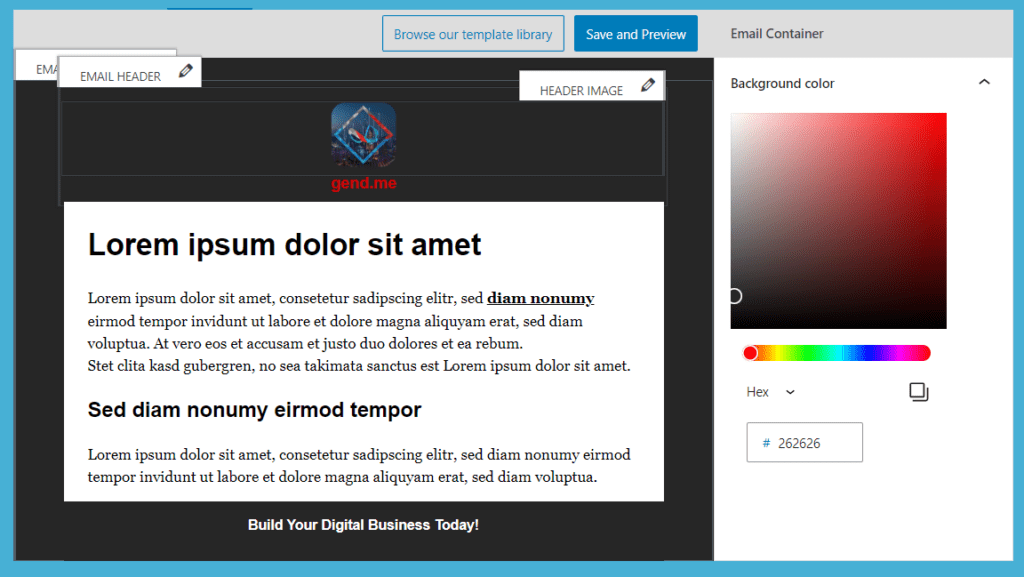
Branding your web app’s email experience begins with designing the base HTML email template. Utilize a visual page builder to customize the header, footer, colors, and text types for all automated emails, including password resets and post notifications.
Navigate to “Email” and then “App Email Template” in the backend dashboard to unleash your creative control.
Streamlining Store Notification Emails
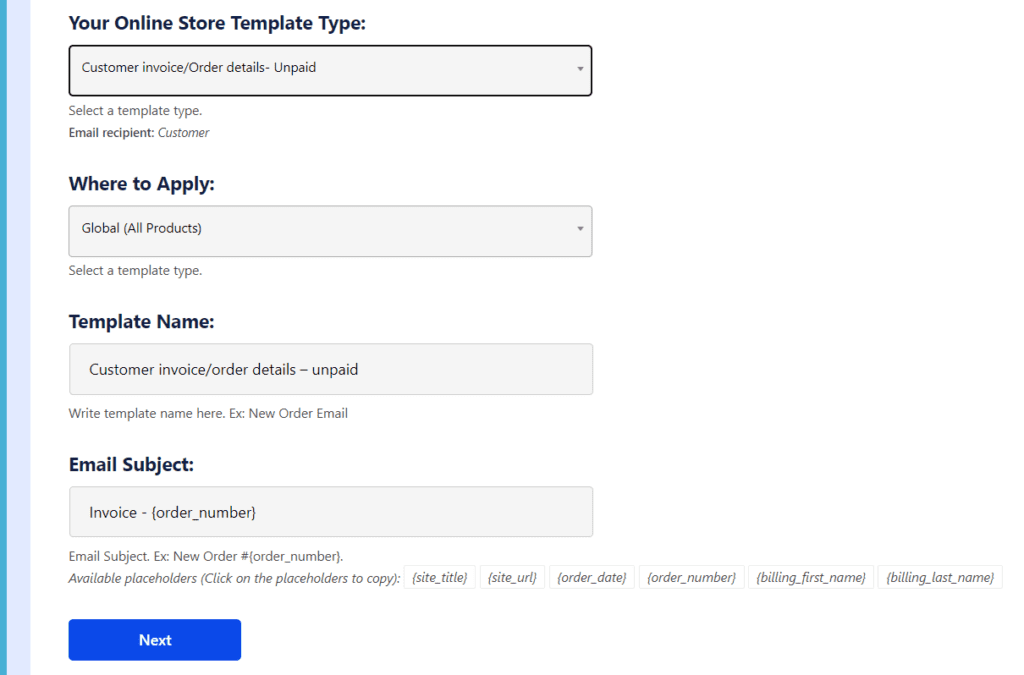
For seamless customer communication, automated email notifications play a crucial role in keeping customers informed about their orders.
Head to the backend dashboard, click on “Email,” and then access “Store Emails” to ensure all your store notifications are visually appealing and provide the right information for efficient order fulfillment.
Fostering Engagement with Community Emails
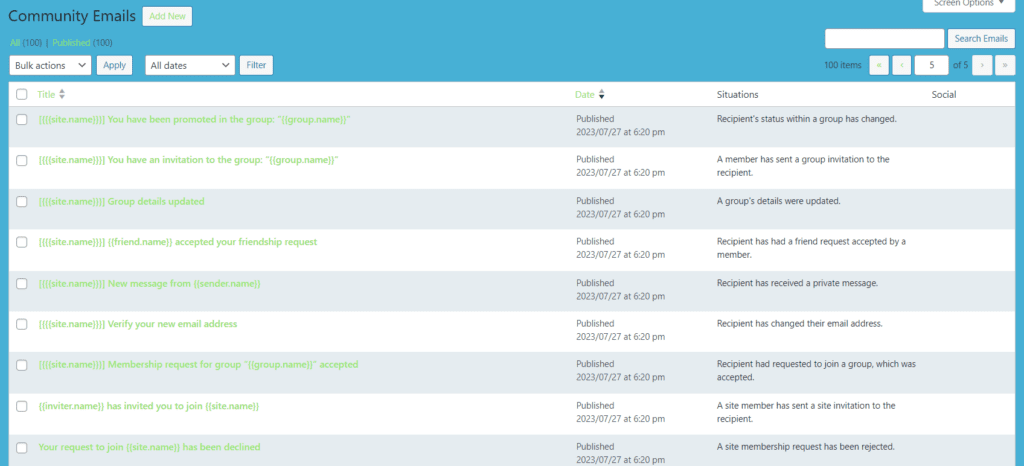
Keeping your community engaged involves sending timely email notifications for profile activities that interest your users.
Manage all your community emails effortlessly by navigating to the backend dashboard, clicking on “Email,” and then selecting “Community Emails.” Keep your users informed and engaged in the vibrant life of your Web App community.
Open Your Store With Digitized Sales Offers
Your Theme Style Guide serves as the essential rulebook, shaping your brand’s voice across platforms. It outlines font types for a cohesive visual experience, a defined color spectrum to evoke emotions and enhance recognition, logo usage guidelines for consistent brand representation, and an overall look and feel standard for unified communication. This guide empowers your team to maintain brand integrity, fostering trust and leaving a lasting, impactful impression on your audience.
Showcase product feeds with ease, controlling the appearance anywhere on your Web App.
Whether creating a store feed, displaying options, or suggesting upsells/cross-sells, use the “Products” Page builder widget effortlessly.
Visually construct your product pages and gather essential information for sales completion.
Exercise control over template visibility by product, category, and tags, tailoring your approach to each offering.
The Smart Choice
Let’s face it people are connecting remotely online today and if your business isn’t focusing on better supporting your community online you are missing out on a large business opportunity. The major risk being that social media platforms can change any of their policies that affect your business accounts, business data, and digital content.
We make it easy for our App Builder Members to connect and support their entire community.
When creating your Web App Logo, prioritize establishing brand consistency throughout your digital landscape. It’s crucial to consider all digital assets from the outset, as users often initiate their interaction with your business online.
Build Your Web App
Managed Web App Onboarding
Digital Logos
Defining Your Digital Presence Through Branded Logos
Site Logo – Versatility Matters
Ensure your Web App Logo shines on both light and dark backgrounds. With users customizing their settings, it’s vital to maintain a visually appealing logo in various situations where background shades may differ.
Site Favicon
Beyond your main logo, there are instances where a compact square version is essential. From serving as a favicon on browser tabs to becoming your App Icon on mobile devices, having a matching favicon is imperative for user recognition across the web. Design a favicon that resonates with users wherever they encounter your brand!
Site Logo – Versatility Matters
Ensure your Web App Logo shines on both light and dark backgrounds. With users customizing their settings, it’s vital to maintain a visually appealing logo in various situations where background shades may differ.
Site Favicon
Beyond your main logo, there are instances where a compact square version is essential. From serving as a favicon on browser tabs to becoming your App Icon on mobile devices, having a matching favicon is imperative for user recognition across the web. Design a favicon that resonates with users wherever they encounter your brand!
Your Theme Style Guide serves as the essential rulebook, shaping your brand’s voice across platforms. It outlines font types for a cohesive visual experience, a defined color spectrum to evoke emotions and enhance recognition, logo usage guidelines for consistent brand representation, and an overall look and feel standard for unified communication. This guide empowers your team to maintain brand integrity, fostering trust and leaving a lasting, impactful impression on your audience.
Build Your Web App
Managed Web App Onboarding
Digital Style Guide
Infusing Emotion into Your Online Palette
Choosing your brand colors goes beyond aesthetics; it’s a strategic decision to evoke the right emotions. In the digital realm, colors are represented by hex codes (e.g., white is #ffffff, black is #000000).
Streamline the management of your web app colors through the intuitive site settings dashboard, empowering your Digital Business to consistently reflect your branding choices as you visually pick your hex colors.
How to update Web App Global Colors
Elevate Your Web App’s Aesthetics with Ease
As an admin user viewing your connected web app, access color settings through the “Edit with Visual Page Builder” navigation item. Hover over it to reveal the “Site Settings” menu item and click on it.
Within your Site Settings, click on “Global Colors.” Aligned with your Brand Style Guide, your web app will be meticulously matched to your brand colors. Share your main colors through the color picker below or provide RGB or Hex codes.
Ensure readability brilliance by carefully selecting font types for your Brand Style Guide, focusing on seamless rendering across the web.
Opt for a Google Font type that aligns with your brand’s identity. Explore a plethora of options at fonts.google.com.
How to update Web App Global Fonts
As an admin user viewing your connected web app, access font settings through the “Edit with Visual Page Builder” navigation item. Hover over it to reveal the “Site Settings” menu item and click on it.
From there, navigate to the “Global Fonts” tab in the side menu of your “Site Settings.”
Effortlessly configure, manage, and update your web app’s site-wide settings from this centralized hub. Craft a captivating and consistent typographic experience for your users.
Infusing Emotion into Your Online Palette
Choosing your brand colors goes beyond aesthetics; it’s a strategic decision to evoke the right emotions. In the digital realm, colors are represented by hex codes (e.g., white is #ffffff, black is #000000).
Streamline the management of your web app colors through the intuitive site settings dashboard, empowering your Digital Business to consistently reflect your branding choices as you visually pick your hex colors.
How to update Web App Global Colors
Elevate Your Web App’s Aesthetics with Ease
As an admin user viewing your connected web app, access color settings through the “Edit with Visual Page Builder” navigation item. Hover over it to reveal the “Site Settings” menu item and click on it.
Within your Site Settings, click on “Global Colors.” Aligned with your Brand Style Guide, your web app will be meticulously matched to your brand colors. Share your main colors through the color picker below or provide RGB or Hex codes.
Ensure readability brilliance by carefully selecting font types for your Brand Style Guide, focusing on seamless rendering across the web.
Opt for a Google Font type that aligns with your brand’s identity. Explore a plethora of options at fonts.google.com.
How to update Web App Global Fonts
As an admin user viewing your connected web app, access font settings through the “Edit with Visual Page Builder” navigation item. Hover over it to reveal the “Site Settings” menu item and click on it.
From there, navigate to the “Global Fonts” tab in the side menu of your “Site Settings.”
Effortlessly configure, manage, and update your web app’s site-wide settings from this centralized hub. Craft a captivating and consistent typographic experience for your users.
Visually create your entire theme from scratch or utilize pre-built templates for headers, footers, pages, and more!
We provide our members with easy-to-use, no-code tools, enabling them to build and own their entire Web App Theme effortlessly. Say goodbye to concerns about policies jeopardizing your hard work and audience engagement.
Take control of your web app’s aesthetic with ease.
Responsive Design
Develop and test designs seamlessly on Mobile, Tablet, and Desktop.
Customize the appearance and specify what content should be displayed on different devices for a responsive and user-friendly experience.
We provide our members with easy-to-use, no-code tools, enabling them to build and own their entire Web App Theme effortlessly. Say goodbye to concerns about policies jeopardizing your hard work and audience engagement.
Take control of your web app’s aesthetic with ease.
Scheduled Automatic Targeted Email, the Power of Email. Ensuring Secure Communication.
Email remains one of the most secure forms of business communication, offering business owners complete control over their email lists. Our platform provides pre-integrated capabilities, allowing business owners to fully brand their Web App emails, ensuring instant and secure communication. Customize your automated email notifications to create a cohesive and unified experience for your online customers.
Email marketing to members that are expeting to receive mail from you is an extremely effective marketing strategy.
We provide you with the tools needed to segment your users and customers to provide them automatic scheduled emails to automatically support, onboard and upsell to the users on your web app.
Crafting a Branded Email Experience for Your Web App
Branding your web app’s email experience begins with designing the base HTML email template. Utilize a visual page builder to customize the header, footer, colors, and text types for all automated emails, including password resets and post notifications.
Navigate to “Email” and then “App Email Template” in the backend dashboard to unleash your creative control.
Streamlining Store Notification Emails
For seamless customer communication, automated email notifications play a crucial role in keeping customers informed about their orders.
Head to the backend dashboard, click on “Email,” and then access “Store Emails” to ensure all your store notifications are visually appealing and provide the right information for efficient order fulfillment.
Fostering Engagement with Community Emails
Keeping your community engaged involves sending timely email notifications for profile activities that interest your users.
Manage all your community emails effortlessly by navigating to the backend dashboard, clicking on “Email,” and then selecting “Community Emails.” Keep your users informed and engaged in the vibrant life of your Web App community.
Crafting a Branded Email Experience for Your Web App
Branding your web app’s email experience begins with designing the base HTML email template. Utilize a visual page builder to customize the header, footer, colors, and text types for all automated emails, including password resets and post notifications.
Navigate to “Email” and then “App Email Template” in the backend dashboard to unleash your creative control.
Streamlining Store Notification Emails
For seamless customer communication, automated email notifications play a crucial role in keeping customers informed about their orders.
Head to the backend dashboard, click on “Email,” and then access “Store Emails” to ensure all your store notifications are visually appealing and provide the right information for efficient order fulfillment.
Fostering Engagement with Community Emails
Keeping your community engaged involves sending timely email notifications for profile activities that interest your users.
Manage all your community emails effortlessly by navigating to the backend dashboard, clicking on “Email,” and then selecting “Community Emails.” Keep your users informed and engaged in the vibrant life of your Web App community.
Open Your Store With Digitized Sales Offers
Your Theme Style Guide serves as the essential rulebook, shaping your brand’s voice across platforms. It outlines font types for a cohesive visual experience, a defined color spectrum to evoke emotions and enhance recognition, logo usage guidelines for consistent brand representation, and an overall look and feel standard for unified communication. This guide empowers your team to maintain brand integrity, fostering trust and leaving a lasting, impactful impression on your audience.
Showcase product feeds with ease, controlling the appearance anywhere on your Web App.
Whether creating a store feed, displaying options, or suggesting upsells/cross-sells, use the “Products” Page builder widget effortlessly.
Visually construct your product pages and gather essential information for sales completion.
Exercise control over template visibility by product, category, and tags, tailoring your approach to each offering.
Showcase product feeds with ease, controlling the appearance anywhere on your Web App.
Whether creating a store feed, displaying options, or suggesting upsells/cross-sells, use the “Products” Page builder widget effortlessly.
Visually construct your product pages and gather essential information for sales completion.
Exercise control over template visibility by product, category, and tags, tailoring your approach to each offering.
The Smart Choice
Let’s face it people are connecting remotely online today and if your business isn’t focusing on better supporting your community online you are missing out on a large business opportunity. The major risk being that social media platforms can change any of their policies that affect your business accounts, business data, and digital content.
We make it easy for our App Builder Members to connect and support their entire community.